


Airbrush: Face & Photo Editor
4.130.45K Reviews
App Specs
- Version
- 8.15.1
- Updated On
- License
- Free
- Downloads
- 100,000,000+
- Developer
- PIXOCIAL TECHNOLOGY (SINGAPORE) PTE. LTD.
- Categories
- Photography
- Platform
- Android, iOS
Screenshots
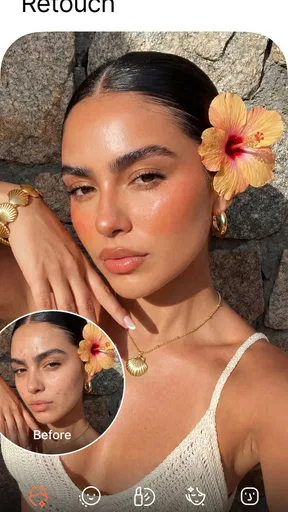
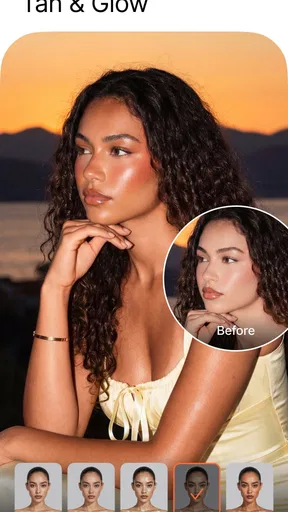

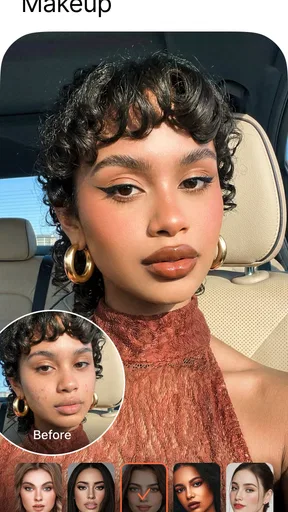


 Analysis by AppCompare
I tend to choose a photo editor by asking one practical question: do I want to polish a portrait quickly, or do I want detailed control over the whole image? Airbrush: Face & Photo Editor is aimed squarely at the first job. It is a free photography app from PIXOCIAL TECHNOLOGY (SINGAPORE) PTE. LTD., with optional in-app purchases ranging from $0.49 to $89.99 per item. Its 4.0 average from around 1.6 million ratings and more than 50 million installs suggest a broad audience, though popularity alone won’t tell you whether its editing style suits you.
Choose it for quick portrait work
The app makes the most sense when you already like a picture but want to tidy one or two details before sharing it. A small blemish, uneven-looking skin, or a smile that seems dull in the lighting can be easier to address here than in a general-purpose editor built around layers, curves, or precise color adjustments. The central trade-off is convenience: portrait-focused tools can save time, but they can also tempt you to change more than the photo needs.
For a believable result, I’d work in small steps and check the full image after every adjustment. A face can look smooth when zoomed in yet noticeably artificial at normal size, especially if skin texture disappears or the edit makes the face brighter than the surrounding scene. I also compare the edited image with the original before deciding I’m done. That quick check helps me keep the person recognizable and the lighting consistent rather than treating every visible detail as a flaw.
A practical photo-to-share routine
Imagine taking a quick portrait before meeting friends. The framing is good, but a temporary spot catches your eye and the indoor light makes your smile look less lively. I’d choose the image, make a restrained cleanup, preview it at ordinary viewing size, and stop as soon as it feels like the same moment with a little less distraction. That is a better use of a retouching app than piling on several effects just because they are available.
A useful habit is to keep an untouched copy of any picture you care about. It gives you room to compare versions later and avoids making a one-way decision while you are still experimenting. If you are editing several photos from the same occasion, judge them together: a portrait that looks polished by itself can look oddly bright or heavily softened beside the rest. Matching the overall feel matters more than making each image look maximally edited.
What to weigh before you install
Airbrush is free to download, but some options involve purchases, so I would explore the basic workflow before paying for anything. The age rating is Everyone 10+, and the current version is 8.2.0, with Android 8.0 as the minimum operating system. If you are on an older device, check how it handles your own photos rather than assuming every edit will feel instant; large images and demanding effects can be less comfortable on modest hardware.
It also helps to decide what “natural” means to you. For a profile picture, a subtle adjustment may be welcome; for a family photo, preserving everyone’s real features may matter more than a flawless finish. If the app’s preview encourages edits that make you look unlike yourself, that is a good reason to skip those tools, not a cue to keep adjusting until the result feels acceptable.
Worth Reading Before You Choose

Flipboard Shows What News Apps Must Do Beyond the Feed

Switching to Android Auto Means Rethinking Your Driving Routine

Google Calendar Makes a Crowded Week Easier to Manage

Ludo King Makes the Most of the Minutes Between Plans

Baby Panda World Brings Quick Play to Modern Phones, but Its Game Library Feels Busy

ESPN’s Live Game View Makes Following Close Games Easier
Where other editors make more sense
Compared with a general photo editor, Airbrush puts portrait retouching closer to the front of the experience. That focus is useful when you want to fix a face quickly, but it is not automatically the best fit for landscapes, product photos, or careful color work. A broader editor is usually the better choice when you need fine control over exposure, color, cropping, or a consistent look across a batch of images. A camera app with restrained filters may be enough if you mainly want a finished look without retouching individual features.
I’d also consider your comfort with face editing. Some people enjoy being able to remove a temporary distraction; others would rather leave faces untouched or make only global adjustments. Neither preference is wrong. If you routinely spend time undoing automatic-looking changes, or you need precise, repeatable edits for work, a more manual editor may feel less frustrating. Airbrush is most appealing when speed and portrait-specific convenience matter more than deep control.
Getting Started with Airbrush
First off, downloading and setting up Airbrush is a breeze. It's available for both Android and iOS, so no worries about compatibility. Once you open the app, you're greeted with a sleek, user-friendly interface. The layout is intuitive, making it easy to navigate even if you’re not a tech wizard. Just pick a photo from your gallery or snap a new one, and you’re ready to roll.
Features That Make You Smile
There’s a suite of editing tools that cater to every possible need. Want to get rid of that unexpected pimple before sharing your selfie? The blemish remover tool is your best friend. I was impressed by how natural the results looked. No one will ever know you had a late-night pizza binge!
Then there’s the teeth whitening feature. It’s perfect for those who want their smile to pop without looking overdone. I tried it on a few photos, and it subtly enhanced my smile, giving it that extra sparkle.
- Retouching Tools: Smooth skin, enhance eyes, and add a touch of blush.
- Magic Brush: Add a little fantasy to your images with fun effects.
- Background Editor: Change up the scenery with a tap.
- Filters: A variety of filters to fit your mood and style.
Why You'll Love It
I have to say, the real-time editing feature is a game-changer. You can see the effects as you edit, which means no more guesswork. It’s especially handy when you’re in a rush and need to make quick adjustments. Plus, the app’s AI technology does a stellar job of detecting facial features, so all the edits look seamless.
And let’s not forget the social media integration. Once you’ve perfected your photo, you can easily share it on your favorite platforms directly from the app. It’s a one-stop-shop for all your editing and sharing needs.
Room for Improvement
While I love most things about Airbrush, there are a few areas that could be polished. Some of the more advanced features require a premium subscription. It’s understandable, but it would be nice to have a few more free options for casual users. Also, if you’re using an older phone, the app might run a bit slow, especially with larger files.
The Verdict
All in all, Airbrush: Face & Photo Editor is a fantastic tool for anyone looking to enhance their photos with ease. It’s packed with features that cater to both beginners and more experienced users. The interface is welcoming, and the results are impressive. Whether you’re prepping your photo for Instagram or just making memories look a little more magical, this app has got you covered.
So, if you’re looking to step up your photo game, give Airbrush a try. Who knows? You might just become the next selfie superstar. Happy editing!
Making edits feel consistent
One detail that can make a portrait edit look more convincing is the order in which I work. I start with the specific distraction I want to reduce, then look at the overall skin and facial balance, and only afterward consider decorative effects or filters. That sequence keeps a small correction from getting buried under a strong visual style. If a filter changes the color of skin or teeth, I revisit those areas rather than assuming the original retouch still looks right.
For group photos, I’m especially cautious about applying face-focused changes uniformly. People have different lighting, skin texture, and expressions, so the same degree of smoothing or brightening can look uneven across one frame. I’d make only the adjustments that solve an obvious issue for a particular person and leave the rest alone. If the whole image needs correction, a general exposure or color tool is often the more coherent solution.
When a quick tool is not enough
Airbrush is not the editor I would reach for to build a carefully matched set of images, remove complex objects, or make fine adjustments to a scene’s color and light. Portrait tools are designed to make face edits accessible, but that convenience is different from having precise, layered control. For those jobs, a manual photo editor is a better starting point; for a simple crop or a modest filter, the editing tools already built into a phone may be sufficient.
There is also a personal boundary to consider. Retouching can be fun when it fixes a temporary distraction, but repeated reshaping or smoothing can make an ordinary photo feel like a performance. I find it helpful to name the one thing I want to change before opening the editor. If I cannot say what needs fixing, I usually leave the image alone. That small rule keeps the process quick and makes it easier to recognize when an edit has gone too far.
Who will get the most from it
I’d recommend trying Airbrush if you often prepare selfies or casual portraits and want accessible face-specific adjustments without learning a complex editing workflow. It can also suit someone who wants to experiment with a background change or a playful effect for a social post. The strongest reason to keep it installed is having those portrait tools ready for the occasional photo that needs a little attention, rather than expecting it to replace every editor on your phone.
If your priority is untouched, documentary-style photography, detailed retouching for professional delivery, or consistent edits across many images, I would look elsewhere first. The same goes for anyone who finds face-altering tools uncomfortable or does not want to navigate optional purchases. A free starting point is convenient, but the in-app purchase range means it is sensible to check which options you actually use before spending. My recommendation is to try a few restrained edits on an unimportant photo, decide whether the look feels like you, and keep Airbrush only if that workflow genuinely saves time.
Pros
- User-friendly interface for easy navigation.
- Wide range of filters and effects available.
- Real-time editing preview for instant results.
- High-quality output images after editing.
- Regular updates with new features and tools.
Cons
- Contains in-app purchases for premium features.
- Occasional ads can interrupt the workflow.
- Some advanced tools require a subscription.
- Limited free version features compared to paid.
- Editing may reduce image resolution slightly.
FAQs for Airbrush: Face & Photo Editor
What features does Airbrush offer for photo editing?
Airbrush provides a comprehensive set of features for photo editing, including blemish removal, teeth whitening, skin smoothing, and reshaping tools. Additionally, it offers artistic filters, background editing, and makeup tools. The app is designed to enhance selfies and portraits with its user-friendly interface, making it accessible for both beginners and advanced users.
Is Airbrush free to use, or are there in-app purchases?
Airbrush is free to download and offers a variety of basic editing tools at no cost. However, it also includes in-app purchases and subscriptions for premium features. These may include advanced filters, more detailed retouching options, and ad-free usage. Users can choose to pay monthly or annually for these upgrades.
How does Airbrush compare to other photo editing apps?
Airbrush stands out for its simplicity and effectiveness in enhancing selfies and portraits. While apps like Adobe Photoshop offer more advanced editing capabilities, Airbrush excels in user-friendly, quick edits. Its focus on retouching makes it particularly popular among users looking for fast, high-quality results without the complexity of professional software.
Can Airbrush be used on both Android and iOS devices?
Yes, Airbrush is available for both Android and iOS devices. It can be downloaded from the Google Play Store for Android users and the Apple App Store for iOS users. The app is optimized for both platforms, ensuring a smooth and consistent experience across different devices and operating systems.
Is there a community or support for Airbrush users?
Airbrush offers a supportive community through its social media channels and user forums where users can share tips, tutorials, and creative ideas. Additionally, the app provides customer support for technical issues or account inquiries. This community engagement helps users maximize their experience and stay updated on new features and trends.


